This guide explains how to fix the “QUIC.cloud’s access to your WP REST API seems to be blocked” error in WordPress, especially when using Cloudflare and LiteSpeed Cache.
When using the Litespeed Cache plugin in WordPress, I encountered an issue:
-“QUIC.cloud’s access to your WP REST API seems to be blocked.”
-“Failed to communicate with QUIC.cloud server: Unknown error: unknown [server] https://wpapi.quic.cloud[service] tool/wp_rest_echo”
My Server Environment
aapanel
WordPress
Nginx
Mysql
Php
Cloudflare
Comprehensive Tutorial for a Full Fix:
Official Reference Link:
https://docs.quic.cloud/troubleshooting/restapi
https://wordpress.org/support/topic/troubleshooting-guide-wpapi-echo-data-failure
Why This Error Happens (Root Cause Analysis)
Cause #1: Nginx Does Not Detect Real Visitor IP
The server’s Nginx is not correctly detecting the Real Visitor IP. It only sees Cloudflare’s proxy IP, so Litespeed Cache rejects the non-official IP request. This results in a WP REST API error or wp_rest_echo error.
Cause #2: WordPress REST API Is Blocked or Misconfigured
WordPress REST API is not properly enabled, or Litespeed Cache is unable to use WordPress REST API correctly, leading to a WP REST API error or wp_rest_echo error.
Cause #3: Cloudflare Is Blocking QUIC.cloud Requests
Cloudflare is blocking the request from the Litespeed Cache server, preventing it from properly connecting to your server. This may also trigger a WP REST API error or wp_rest_echo error.
Cause #4: Cloudflare Proxy Prevents QUIC.cloud from Reaching the Origin Server
If you are using Cloudflare’s DNS resolution service like I am, please note that before enabling the QUIC feature, turn the orange cloud icon next to your domain’s A record gray. This way, your website will not go through Cloudflare’s CDN nodes, allowing QUIC to correctly identify your server and successfully complete the authentication. You might want to give this method a try.
Log Analysis
Log description:
Here I’m posting the Litespeed Cache logs from that time, so everyone can compare and see whether the situation is similar to their own (domain information has been blurred).
Full Log:
Click to view full log
12/01/25 03:15:26.061 [172.69.134.21:12831 1 IE7] 💓 ------GET HTTP/2.0 (HTTPS) /wp-admin/admin.php 12/01/25 03:15:26.061 [172.69.134.21:12831 1 IE7] Query String: page=litespeed&LSCWP_CTRL=cloud&LSCWP_NONCE=1a2c1dfd8e&litespeed_type=activate 12/01/25 03:15:26.061 [172.69.134.21:12831 1 IE7] HTTP_REFERER: https://XXX.com/wp-admin/admin.php?page=litespe... 12/01/25 03:15:26.061 [172.69.134.21:12831 1 IE7] User Agent: Mozilla/5.0 (Windows NT 10.0; Win64; x64) AppleWebKit... 12/01/25 03:15:26.061 [172.69.134.21:12831 1 IE7] Accept: text/html,application/xhtml+xml,application/xml;q=0.9,image/avif,image/webp,image/apng,*/*;q=0.8,application/signed-exchange;v=b3;q=0.7 12/01/25 03:15:26.061 [172.69.134.21:12831 1 IE7] Accept Encoding: gzip, br 12/01/25 03:15:26.061 [172.69.134.21:12831 1 IE7] Cookie _lscache_vary: fecd3a5480b7070a6f8eff578441a5ed 12/01/25 03:15:26.061 [172.69.134.21:12831 1 IE7] X-LSCACHE: false 12/01/25 03:15:26.481 [172.69.134.21:12831 1 IE7] 👮 No cache due to Admin page 12/01/25 03:15:26.730 [172.69.134.21:12831 1 IE7] 💵 X Cache_control -> no Cache ( logged in user ) => LiteSpeed\Root::debug(💵 X Cache_control -> no Cache ( logged in user ),5)@60 => LiteSpeed\Control::set_nocache(( logged in user ))@434 => LiteSpeed\Vary->after_user_init()@111 => LiteSpeed\LSC->after_user_init()@251 => WP_Hook->apply_filters(ARRAY)@324 => WP_Hook->do_action(ARRAY)@348 12/01/25 03:15:26.730 [172.69.134.21:12831 1 IE7] 📺 init 12/01/25 03:15:26.730 [172.69.134.21:12831 1 IE7] [LQIP] init 12/01/25 03:15:26.730 [172.69.134.21:12831 1 IE7] [CDN] init 12/01/25 03:15:26.731 [172.69.134.21:12831 1 IE7] [Router] CDN bypassed: is not ajax call 12/01/25 03:15:26.731 [172.69.134.21:12831 1 IE7] [Router] CDN bypassed: ajax call from admin 12/01/25 03:15:26.731 [172.69.134.21:12831 1 IE7] ⏰ Init 12/01/25 03:15:26.731 [172.69.134.21:12831 1 IE7] [Router] LSCWP_CTRL: cloud 12/01/25 03:15:26.731 [172.69.134.21:12831 1 IE7] [Router] LSCWP_CTRL verified: 'cloud' 12/01/25 03:15:26.731 [172.69.134.21:12831 1 IE7] [Router] parsed type: activate => LiteSpeed\Router::verify_type()@524 => LiteSpeed\Cloud->handler()@2227 => LiteSpeed\Router->handler(cloud)@831 12/01/25 03:15:26.745 [172.69.134.21:12831 1 IE7] ❄️ posting to : https://wpapi.quic.cloud/tool/wp_rest_echo 12/01/25 03:15:26.745 [172.69.134.21:12831 1 IE7] ❄️ data 12/01/25 03:15:27.994 [172.71.195.36:12916 1 Jkz] 💓 ------POST HTTP/2.0 (HTTPS) / 12/01/25 03:15:27.994 [172.71.195.36:12916 1 Jkz] Query String: rest_route=/litespeed/v3/wp_rest_echo 12/01/25 03:15:27.994 [172.71.195.36:12916 1 Jkz] User Agent: QUIC cloud bot/1.0 12/01/25 03:15:27.994 [172.71.195.36:12916 1 Jkz] Accept: application/json 12/01/25 03:15:27.994 [172.71.195.36:12916 1 Jkz] Accept Encoding: gzip, br 12/01/25 03:15:27.994 [172.71.195.36:12916 1 Jkz] X-LSCACHE: false 12/01/25 03:15:28.382 [172.71.195.36:12916 1 Jkz] 📺 init 12/01/25 03:15:28.383 [172.71.195.36:12916 1 Jkz] [Router] get_role: 12/01/25 03:15:28.383 [172.71.195.36:12916 1 Jkz] [LQIP] init 12/01/25 03:15:28.383 [172.71.195.36:12916 1 Jkz] 🎢 init 12/01/25 03:15:28.383 [172.71.195.36:12916 1 Jkz] [CDN] init 12/01/25 03:15:28.383 [172.71.195.36:12916 1 Jkz] ⏰ Init 12/01/25 03:15:28.384 [172.71.195.36:12916 1 Jkz] [Router] LSCWP_CTRL bypassed empty 12/01/25 03:15:28.384 [172.71.195.36:12916 1 Jkz] [GUI] init 12/01/25 03:15:28.450 [172.71.195.36:12916 1 Jkz] 💵 Cache_control init on 12/01/25 03:15:28.865 [172.71.195.36:12916 1 Jkz] 🔱 Rest API init disabled vary change 12/01/25 03:15:28.946 [172.71.195.36:12916 1 Jkz] [REST]
✅ Internal REST ON [filter] rest_request_before_callbacks 12/01/25 03:15:28.947 [172.71.195.36:12916 1 Jkz] ❄️
❌ Not our cloud IP 12/01/25 03:15:28.947 [172.71.195.36:12916 1 Jkz] ❄️ Force updating ip as ips_ts_runner is older than 10mins 12/01/25 03:15:28.947 [172.71.195.36:12916 1 Jkz] ❄️ Load remote Cloud IP list from https://quic.cloud/ips 12/01/25 03:15:29.595 [172.71.195.36:12916 1 Jkz] ❄️ Load ips --- array ( 0 => '102.221.36.98', 1 => '103.106.229.82', 2 => '103.106.229.94', 3 => '103.146.63.42', 4 => '103.152.118.219', 5 => '103.152.118.72', 6 => '103.164.203.163', 7 => '103.167.151.84', 8 => '103.72.163.222', 9 => '103.75.117.169', 10 => '104.244.77.37', 11 => '108.61.158.223', 12 => '108.61.200.94', 13 => '109.248.43.195', 14 => '136.243.106.228', 15 => '139.84.230.39', 16 => '141.164.38.65', 17 => '144.202.90.7', 18 => '146.88.239.197', 19 => '147.78.0.165', 20 => '147.78.3.161', 21 => '149.202.71.83', 22 => '149.28.136.245', 23 => '149.28.47.113', 24 => '149.28.85.239', 25 => '15.204.106.41', 26 => '15.204.231.24', 27 => '15.235.180.91', 28 => '15.235.181.227', 29 => '152.53.162.246', 30 => '152.53.167.143', 31 => '152.53.169.106', 32 => '152.53.36.14', 33 => '152.53.38.14', 34 => '154.205.144.192', 35 => '155.138.221.81', 36 => '156.67.218.140', 37 => '157.90.154.114', 38 => '158.51.123.249', 39 => '162.254.117.80', 40 => '162.254.118.29', 41 => '163.182.174.161', 42 => '163.47.21.168', 43 => '164.52.202.100', 44 => '167.71.185.204', 45 => '167.88.61.211', 46 => '170.249.218.98', 47 => '173.234.26.74', 48 => '176.9.114.118', 49 => '178.17.171.177', 50 => '178.22.124.251', 51 => '178.255.220.12', 52 => '18.192.146.200', 53 => '185.116.60.231', 54 => '185.116.60.232', 55 => '185.126.237.51', 56 => '185.212.169.91', 57 => '185.228.26.40', 58 => '185.231.233.130', 59 => '185.53.57.40', 60 => '185.53.57.89', 61 => '188.172.228.182', 62 => '188.172.229.113', 63 => '188.64.184.71', 64 => '190.92.176.5', 65 => '191.96.101.140', 66 => '192.248.156.201', 67 => '192.248.191.135', 68 => '192.99.38.117', 69 => '193.203.191.189', 70 => '194.36.144.221', 71 => '195.137.220.243', 72 => '195.231.17.141', 73 => '199.247.28.91', 74 => '199.59.247.242', 75 => '201.182.97.70', 76 => '209.124.84.191', 77 => '209.208.26.218', 78 => '211.23.143.87', 79 => '213.159.1.75', 80 => '213.183.48.170', 81 => '213.184.85.245', 82 => '216.128.179.195', 83 => '216.238.104.48', 84 => '216.238.71.13', 85 => '23.160.56.125', 86 => '23.95.72.16', 87 => '31.131.4.244', 88 => '31.22.115.186', 89 => '31.40.212.152', 90 => '37.120.163.165', 91 => '38.114.121.40', 92 => '38.54.30.228', 93 => '38.54.79.187', 94 => '38.60.253.237', 95 => '40.160.225.31', 96 => '40.160.241.195', 97 => '41.185.29.210', 98 => '41.223.52.170', 99 => '45.124.65.86', 100 => '45.248.77.61', 101 => '45.32.123.201', 102 => '45.32.183.112', 103 => '45.32.203.144', 104 => '45.32.67.144', 105 => '45.32.77.223', 106 => '45.63.67.181', 107 => '45.76.252.131', 108 => '45.77.148.74', 109 => '45.77.165.216', 110 => '45.77.51.171', 111 => '46.250.220.133', 112 => '49.12.102.29', 113 => '5.134.119.103', 114 => '51.158.202.109', 115 => '51.77.165.6', 116 => '51.81.33.156', 117 => '51.89.11.45', 118 => '54.36.103.97', 119 => '57.128.230.229', 120 => '57.129.146.219', 121 => '61.219.247.87', 122 => '61.219.247.90', 123 => '64.176.165.8', 124 => '64.176.4.251', 125 => '64.227.16.93', 126 => '65.108.104.232', 127 => '65.109.39.175', 128 => '65.20.76.133', 129 => '65.21.81.51', 130 => '66.42.124.101', 131 => '66.42.75.121', 132 => '67.219.99.102', 133 => '69.50.95.250', 134 => '70.34.206.56', 135 => '74.91.25.147', 136 => '79.172.239.249', 137 => '81.31.156.245', 138 => '81.31.156.246', 139 => '83.138.12.246', 140 => '86.105.14.231', 141 => '86.105.14.232', 142 => '89.147.110.130', 143 => '89.58.38.4', 144 => '91.148.135.53', 145 => '91.201.67.121', 146 => '91.228.7.67', 147 => '92.118.205.75', 148 => '94.75.232.90', 149 => '95.179.145.87', 150 => '95.179.245.162', 151 => '95.216.116.209', ) 12/01/25 03:15:29.596 [172.71.195.36:12916 1 Jkz] ❄️
❌ 2nd time: Not our cloud IP 12/01/25 03:15:29.596 [172.71.195.36:12916 1 Jkz] [REST] ❎ Internal REST OFF [filter] rest_request_after_callbacks 12/01/25 03:15:29.616 [172.71.195.36:12916 1 Jkz] ❄️
❌ Not our cloud IP 12/01/25 03:15:29.617 [172.71.195.36:12916 1 Jkz] 💵 X Cache_control -> no Cache ( [Ctrl] 4xx/5xx default to no cache [status_header] 401 ) => LiteSpeed\Root::debug(💵 X Cache_control -> no Cache ( [Ctrl] 4xx/5xx default to no cache [status_header] 401 ),5)@60 => LiteSpeed\Control::set_nocache(( [Ctrl] 4xx/5xx default to no cache [status_header] 401 ))@434 => LiteSpeed\Control->check_error_codes(HTTP/2.0 401 Unauthorized,401)@193 => WP_Hook->apply_filters(HTTP/2.0 401 Unauthorized,ARRAY)@326 => /www/wwwroot/XXX.com/wp-includes/functions.php@205 => /www/wwwroot/XXX.com/wp-includes/rest-api/class-wp-rest-server.php@1480 12/01/25 03:15:29.617 [172.71.195.36:12916 1 Jkz] [Core] CHK html bypass: miss footer const 12/01/25 03:15:29.617 [172.71.195.36:12916 1 Jkz] 💵 not cacheable before ctrl finalize 12/01/25 03:15:29.617 [172.71.195.36:12916 1 Jkz] [Router] get_role: 12/01/25 03:15:29.617 [172.71.195.36:12916 1 Jkz] 🔱 role id: failed, guest 12/01/25 03:15:29.617 [172.71.195.36:12916 1 Jkz] [Router] get_role: 12/01/25 03:15:29.617 [172.71.195.36:12916 1 Jkz] [Router] get_role: 12/01/25 03:15:29.617 [172.71.195.36:12916 1 Jkz] 🔱 no custimzed vary 12/01/25 03:15:29.618 [172.71.195.36:12916 1 Jkz] [footer comment] 12/01/25 03:15:29.618 [172.71.195.36:12916 1 Jkz] [Core] CHK html bypass: miss footer const 12/01/25 03:15:29.618 [172.71.195.36:12916 1 Jkz] [Core] run hook litespeed_buffer_finalize 12/01/25 03:15:29.618 [172.71.195.36:12916 1 Jkz] 📺 bypass: Not frontend HTML type 12/01/25 03:15:29.618 [172.71.195.36:12916 1 Jkz] [GUI] bypassed by no counter 12/01/25 03:15:29.618 [172.71.195.36:12916 1 Jkz] 🎢 bypass: Not frontend HTML type 12/01/25 03:15:29.618 [172.71.195.36:12916 1 Jkz] 🎢 Fallback to drop dummy CSS 12/01/25 03:15:29.618 [172.71.195.36:12916 1 Jkz] [Core] Silence Comment due to REST/AJAX 12/01/25 03:15:29.618 [172.71.195.36:12916 1 Jkz] Response headers --- array ( 0 => 'Content-Type: application/json; charset=UTF-8', 1 => 'X-Robots-Tag: noindex', 2 => 'Link: How to Enable LiteSpeed Debug Logs
To enable the logging feature, go to: Click Litespeed Cache-Toolbox-Debug Settings
Debug Log = ON
Debug Level = Advanced
To Debug URI Includes, add litespeed_type=activate and rest_route=/litespeed, one per line Save your changes, and then navigate to the Log View tab.
litespeed_type=activate
rest_route=/litespeed
If there are any logs currently showing, click the Clear Logs button.
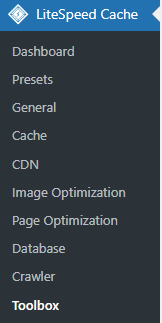


After enabling the logging feature, go to the
“Log View”tab and click“Copy Log” to copy the current logs.
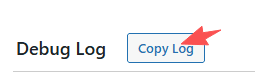
You can copy the log and send it to Litespeed Cache support for analysis and to get an official solution.
Or send it to ChatGPT for analysis- although I feel that ChatGPT’s knowledge is limited and it couldn’t really help me solve the issue (which is a bit sad).
Solutions (Step-by-Step Fix)
Step 1: Fix Real IP Detection in Nginx (Most Common Fix)
For the first issue — “The server’s Nginx does not correctly recognize the Real Visitor IP. It only sees Cloudflare’s proxy IP, so Litespeed Cache rejects the non-official IP connection, causing WP REST API errors or wp_rest_echo errors.” — the fix is:
At the very beginning of your nginx configuration file, add:
# Allow Nginx to correctly recognize the Real Visitor IP instead of Cloudflare’s proxy IP
real_ip_header X-Forwarded-For;
real_ip_recursive on;

# Cloudflare IPv4
set_real_ip_from 173.245.48.0/20;
set_real_ip_from 103.21.244.0/22;
set_real_ip_from 103.22.200.0/22;
set_real_ip_from 103.31.4.0/22;
set_real_ip_from 141.101.64.0/18;
set_real_ip_from 108.162.192.0/18;
set_real_ip_from 190.93.240.0/20;
set_real_ip_from 188.114.96.0/20;
set_real_ip_from 197.234.240.0/22;
set_real_ip_from 198.41.128.0/17;
set_real_ip_from 162.158.0.0/15;
set_real_ip_from 104.16.0.0/12;

# Cloudflare IPv6
set_real_ip_from 2400:cb00::/32;
set_real_ip_from 2606:4700::/32;
set_real_ip_from 2803:f800::/32;
set_real_ip_from 2405:b500::/32;
set_real_ip_from 2405:8100::/32;
set_real_ip_from 2a06:98c0::/29;
set_real_ip_from 2c0f:f248::/32;
Step 2: Ensure WordPress REST API Works for QUIC.cloud
“The WordPress REST API is not properly enabled, or Litespeed Cache cannot correctly use the WordPress REST API,”
the steps to fix it are:
Go to your WordPress dashboard, then navigate to:
Appearance → Theme File Editor
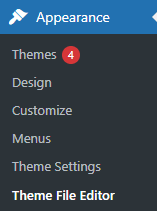
Next, in the Theme Files section on the right, find functions.php and click on it.
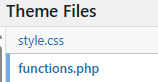
At this point, we can start editing the functions.php file of your current theme. Please note: before making any changes, make sure to back up your website.
Then, scroll to the very bottom and add the following code:
add_filter( 'rest_authentication_errors', function( $result ) {
    $ua = $_SERVER['HTTP_USER_AGENT'] ?? '';
    // Allow QUIC.cloud Bot for LiteSpeed REST API
    if ( strpos( $ua, 'QUIC' ) !== false ) {
        return true;
    }
    return $result;
});

add_action( 'rest_api_init', function () {
    register_rest_route( 'lscwp', '/ip-check', array(
        'methods'             => 'GET',
        'callback'            => function() {
            return rest_ensure_response([
                'remote_ip'         => $_SERVER['REMOTE_ADDR'] ?? 'Null',
                'x_forwarded_for'   => $_SERVER['HTTP_X_FORWARDED_FOR'] ?? 'Null',
                'proxy_remote_addr' => $_SERVER['PROXY_REMOTE_ADDR'] ?? 'Null'
            ]);
        },
        'permission_callback' => '__return_true',
    ));
});
After adding the code, click Save.
At the same time, you also need to edit your Nginx configuration file and locate:
location / {

    try_files $uri $uri/ /index.php?$args;

}
Then, add the following above this block of code:
 # WordPress + LiteSpeed REST API fix
    location /wp-json/ {
    try_files $uri $uri/ /index.php?$args;
    }
Finally, you can visit this link to verify whether your settings are working correctly.
https://your_domain.com/?rest_route=/lscwp/ip-check
{

  "remote_ip": "79.xxx.xxx.183",
  "x_forwarded_for": "79.xxx.xxx.183, 176.xxx.xxx.157",
  "proxy_remote_addr": "176.xxx.xxx.157"
}
remote_ip should match your actual IP (verify at whatsmyip.org)
This confirms PHP detects the correct client IP
The purpose of Step 2 is to enable the LiteSpeed REST API within the WordPress system, which resolves the 401 errors.
Step 3: Allow QUIC.cloud Requests in Cloudflare (Use with Caution)
Go to your Cloudflare dashboard → Security → Security Rules → Create Rule.
Rule name:Allow QUIC.cloud API
Field:URI Path
Operator:contains
Value:/wp-json/litespeed/

Choose action:skip
Log matching requests:ON
WAF components to skip:ALL choose
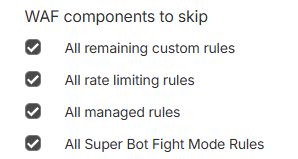
After applying this setting, Cloudflare will allow Litespeed Cache to access your server.
Please note: this carries a security risk. If you resolve the issue using another method, make sure to disable or delete this rule.
Step 4: Temporarily disable the Cloudflare proxy
For troubleshooting purposes, you can temporarily disable the Cloudflare proxy by turning the orange cloud icon gray for the domain’s A record. This allows QUIC.cloud to reach the origin server directly and complete the authentication.
After verification is successful, the Cloudflare proxy can be re-enabled if
needed.
Final Check: How to Verify Everything Is Working
Finally, when we click the Enable QUIC.cloud Services button again, we should be able to connect to QUIC.cloud Online Services normally.